Introduction
Example 1 - An ellipsoid
import hexapy

# instantiate a Mesher object, mesh
mesh = hexapy.Mesher()

# create an ellipsoid with major axis length 1.0 and minor axis length 0.5
mesh.makeEllipsoid(r_major=1.0, r_minor=0.5)

# write the mesh to file named ellipsoid.inp in Abaqus format
mesh.writeToFile(filename="ellipsoid.inp", format="abaqus")

# translate and rotate the ellipsoid
# mesh_index=0 because the ellipsoid was created first and is the only created mesh
# translation is the translation vector
# rx, ry, and rz are the rotations in degrees about the x, y, and z axes, respectively
mesh.applyRigidTransform(mesh_index=0, translation=[0.0, 0.0, 1.0], rx=45.0, ry=20.0, rz=30.0)

#write transformed mesh to file
mesh.writeToFile(filename="transformed_ellipsoid.inp", file_format="abaqus")
Example 2 - An assembly
import hexapy

# instantiate a Mesher object, mesh
mesh = hexapy.Mesher()

# create a box with x edge length of 3.0, y edge length of 2.0, and z edge length of 1.0
mesh.makeBox(x_length=3.0, y_length=2.0, z_length=1.0)

# create an ellipsoid with major axis length 2.0 and minor axis length 1.0
mesh.makeEllipsoid(r_major=1.0, r_minor=0.5)

# translate the ellipsoid
# this time mesh_index=1 because the ellipsoid was created second
mesh.applyRigidTransform(mesh_index=1, translation=[0.0, 0.0, 1.0])

#write transformed mesh to file
mesh.writeToFile(filename="assembly.inp", file_format="abaqus")
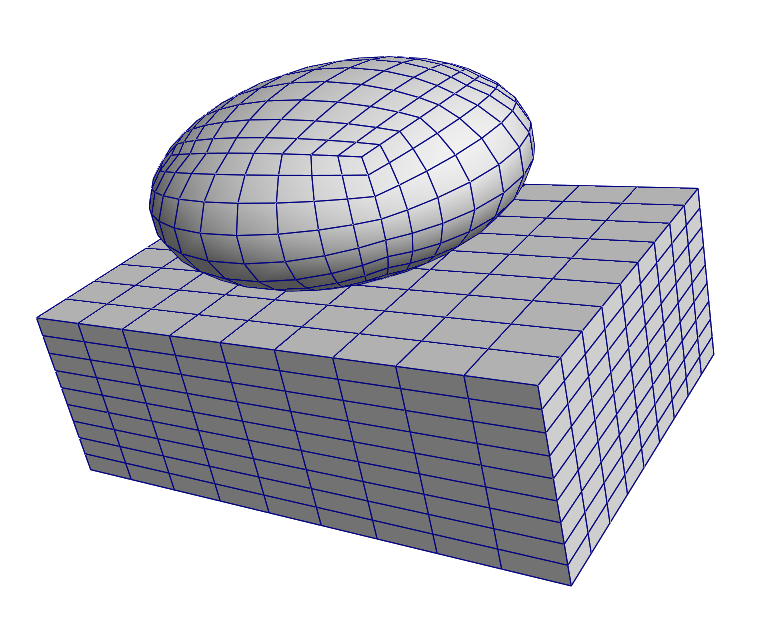
The resulting assembly of ellipsoidal and box meshes from the example 2 code.